Configure Channel - Telegram
The Telegram channel uses Bot Token access and is suitable for quickly connecting Hermes to Telegram private chats or groups.
This page covers
- Authorizing access by scanning a code or opening a link in Telegram on your phone
- Chatting with Hermes in Telegram
> 💡 Prerequisites > > - A phone with Telegram installed > > - Complete model configuration (or use the 100 trial credits included in the Launch plan) >
---
Steps
1. Enter the console
Sign in to LightVela, click "My Hermes" in the upper-right corner to enter the console, and find the "Channel" button.
2. Select the Telegram channel
Find the Telegram card and click "+ Connect".
3. Open Telegram
- Open the Telegram app on your phone
- Search for @BotFather and open the chat
<img src="../images/telegram-botfather-2-global.jpg" alt="" width="360" />
- Send
/start
- Send
/newbot
- Enter a name for your agent: the username must be unique and end with "bot"
- Copy the HTTP API token:
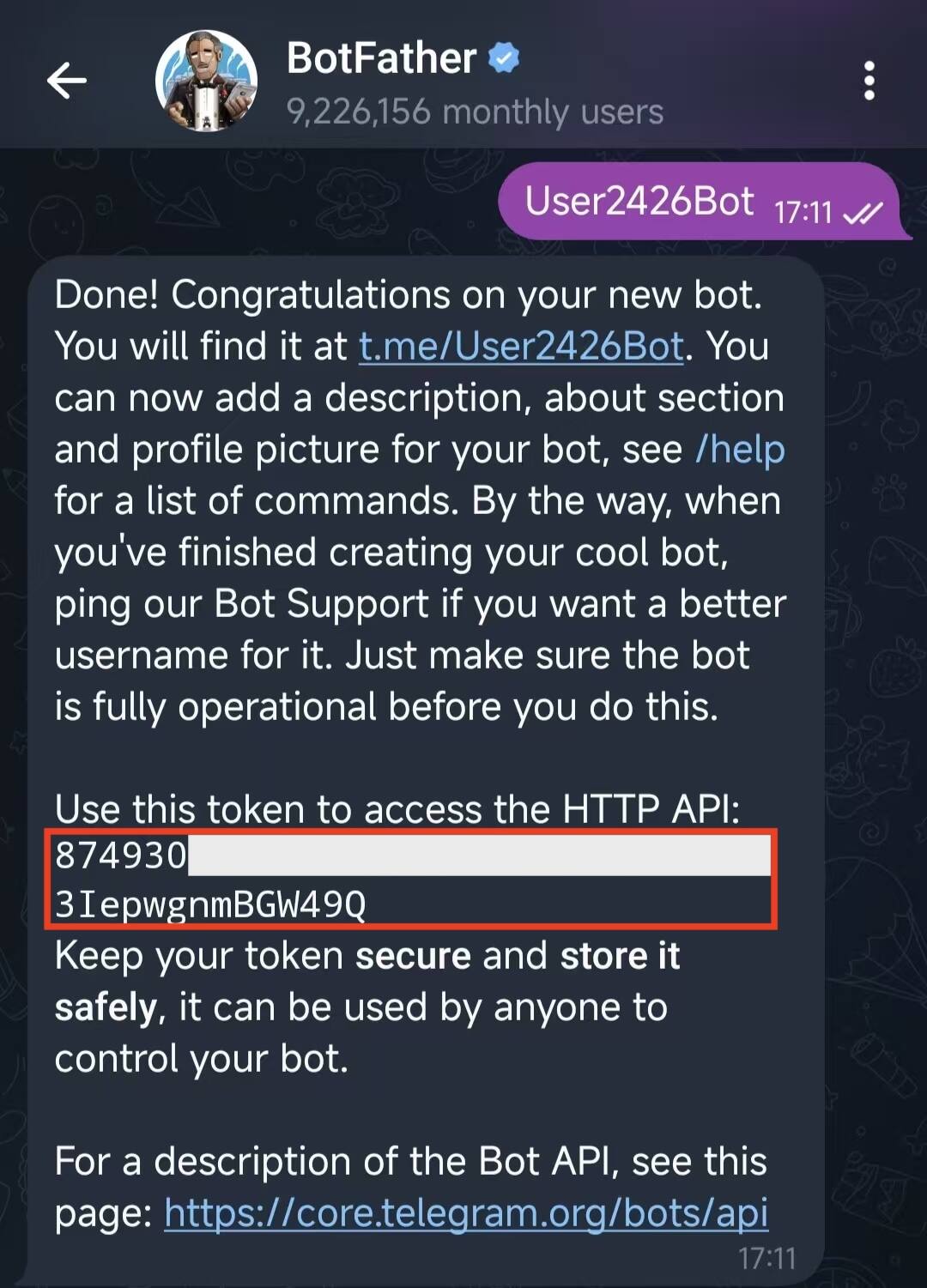
4. Paste the HTTP API token into Telegram
Paste the HTTP API token into the token field.
<img src="../images/telegram-botfather-4-global.png" alt="" width="360" />
> ⚠️ Keep your token safe > > Store the token securely. Anyone who obtains the token can take control of your bot!
5. Chat with the new bot in Telegram
Click the link provided by BotFather and start interacting with the bot.
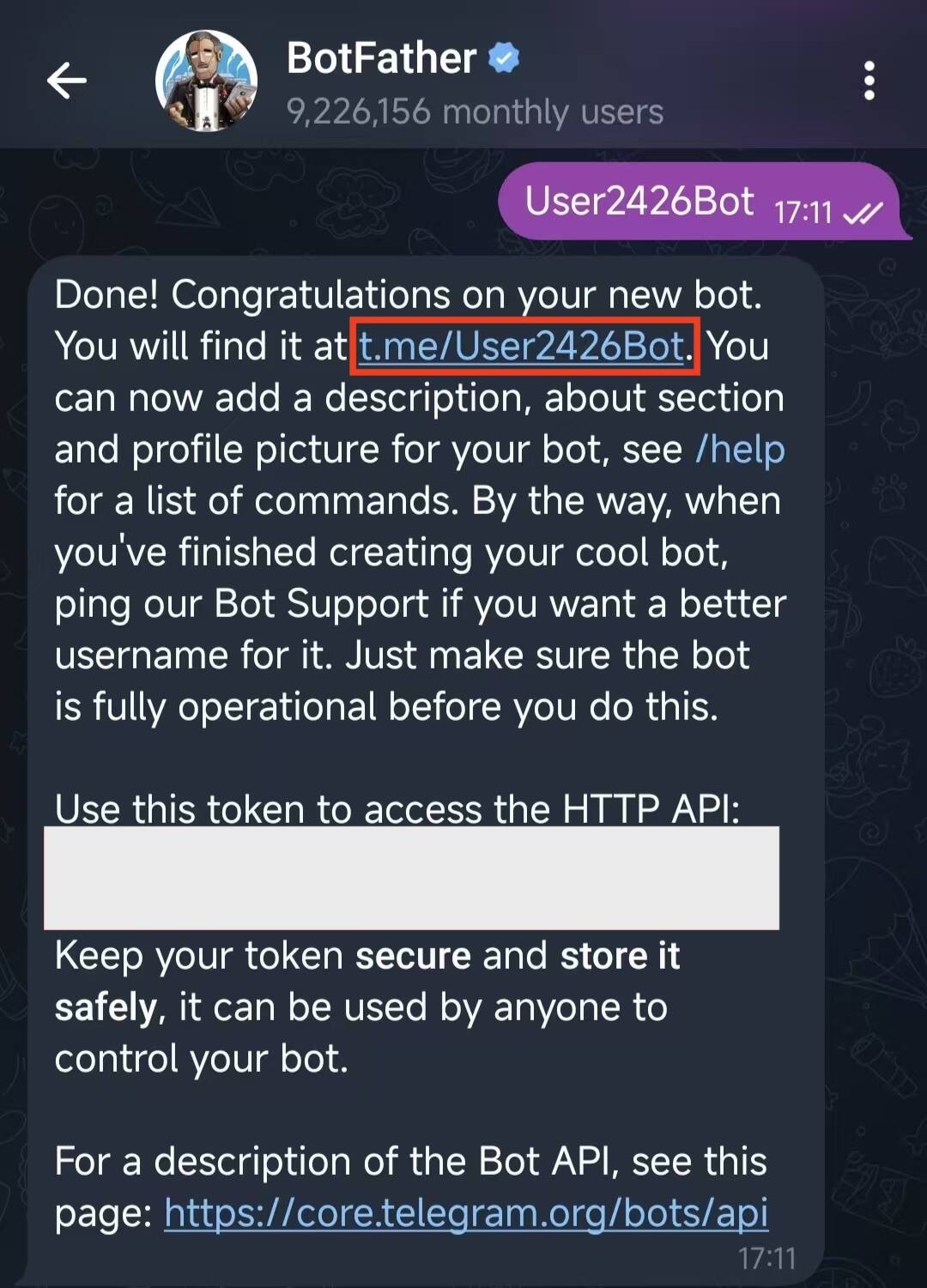
Open the chat with the bot and send a test message:
HiYou should receive a Hermes reply within a few seconds.
<img src="../images/telegram-botfather-6-global-en.png" alt="" width="360" />
---
Success state
- The "Connected channels" list in the console contains "Telegram"
- The corresponding bot can be found in Telegram contacts
- Hermes replies after you send a message
---
Supported message types
After access succeeds, the Telegram bot can receive and reply to basic text messages and supports more message types as follows:
| Message type supported by Telegram bot | Supported |
|---|---|
| Receive text messages | ✅ Supported |
| Receive images and videos | ✅ Supported |
| Receive files | ✅ Supported |
| Reply with text messages | ✅ Supported |
| Reply with images and videos | ✅ Supported |
| Reply with files | ✅ Supported |
| Proactively send messages (such as scheduled reminders) | ✅ Supported |
> ℹ️ Actual processing capability depends on the model > > The table above only indicates the message types supported by the Telegram bot at the channel layer. Whether images, files, and other tasks can actually be processed also depends on whether the large language model connected to Hermes has the corresponding capabilities.
---
FAQ
| Issue | Possible cause | Solution |
|---|---|---|
| BotFather cannot create a bot | The bot name or username does not meet Telegram's requirements | The display name can be anything, but the username must end with bot, e.g. my_hermes_bot |
| BotFather did not return an HTTP API token | The creation flow was not completed | Return to the BotFather chat, run /newbot again, and follow the prompts to set the name and username |
| Token shows as invalid after pasting | The token is incomplete or contains extra spaces / line breaks | Re-copy the full HTTP API token from BotFather and paste it into the token field |
| No response after clicking access | Network delay or authorization not completed | Refresh the console to confirm status; if access did not succeed, try again |
| Cannot find the bot in Telegram | You did not click the link provided by BotFather, or did not start the chat | Click the link provided by BotFather, then click Start on the bot page |
| No reply after sending a message | Model is not configured, trial credits are exhausted, or the bot has not been connected successfully | Check the "Current model" status in the "1. Model" card and confirm the Telegram channel shows as connected |
| Bot cannot receive group messages | Telegram group privacy mode restriction | Check Bot Settings in BotFather; if needed, disable Group Privacy or @ the bot in the group |
| How to unlink | — | Delete the corresponding Telegram record in the "Connected channels" list |
| Can the same Telegram bot connect to multiple Hermes instances | Not recommended; one Bot Token should be bound to one Hermes | If you need multiple Hermes instances, create separate Telegram bots |
---
Channel notes
- Message types: Supports text, images, videos, files, voice messages, and more. See "Supported message types" above
- Group chat support: Group chats are not currently supported; only 1-to-1 conversations are supported
- Connection interruption: Long periods of no response may indicate authorization was revoked. Return to the console and authorize access again
---
Next steps
- Configure Channel - WhatsApp — International user communication and customer service
- Configure Channel - Discord — Community operations and developer communities
- Configure Channel - QQ — Bot created manually, integrated via AppID/AppSecret
- Configure Skills — Extend Hermes capabilities