Core Concepts
LightVela involves four core concepts: Hermes, models, channels, and skills. This page explains their roles. For detailed configuration steps, see the corresponding configuration pages.
This page covers
- The relationship between the four concepts
- Characteristics of a Hermes instance
- The positioning and configuration entry points of models, channels, and skills
- The internal flow of a complete conversation
---
Concept relationship
┌──────────────────────────────────────────────────────────────┐
│                            Hermes                            │
│              (Agent running in the LightVela cloud)           │
└──────────────────────────────────────────────────────────────┘
      │                          │                        │
┌─────┘                          │                        └──────┐
▼                                ▼                               ▼
┌───────┐                   ┌────────┐                   ┌────────┐
│ Model │                   │Channel │                   │ Skill  │
└───────┘                   └────────┘                   └────────┘
Model provider WeChat/Telegram/WhatsApp/Discord SkillHub| Concept | Role | Description |
|---|---|---|
| Hermes | Conversation subject | The AI Agent instance itself |
| Model | Language capability | The large language model called by Hermes |
| Channel | Interaction entry point | The platform where users chat with Hermes |
| Skill | Capability extension | Additional capability packages callable by Hermes |
---
Hermes
Hermes is the AI Agent instance in LightVela. Creating a Hermes is equivalent to starting an independent Agent instance in the cloud.
Hermes has the following characteristics:
- Isolated runtime environment: Each Hermes runs in a dedicated environment isolated from other instances
- Persistent memory: Conversation content is saved across sessions, and the Agent uses historical context when responding
- Always online: Runs 24/7 and does not depend on the user's local device
The current Launch plan supports creating up to 1 Hermes instance.
---
Models
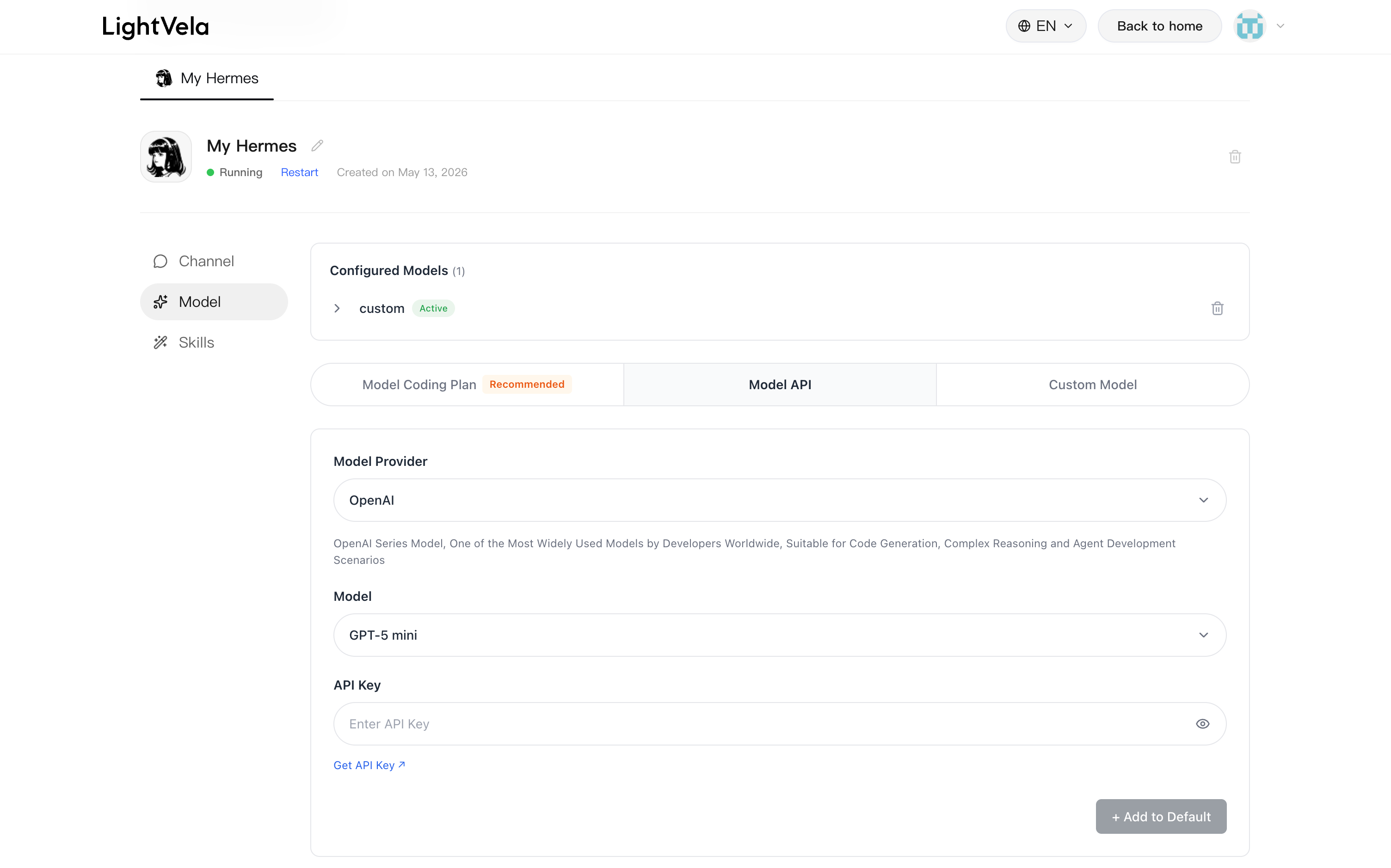
A model is the large language model (LLM) that drives Hermes thinking and responses. LightVela does not train models itself. Instead, users select a calling method in the "Model" card of the console:
| Method | Billing mode | API Key source | Use case |
|---|---|---|---|
| Model Coding Plan | Monthly | Provider | High-frequency usage |
| Model API | Pay-as-you-go | Provider | Low-frequency use or trial |
| Custom model | Depends on endpoint | User-provided | Connect overseas models or OpenAI-compatible endpoints |
In addition, the Launch plan includes 100 trial credits, so you can chat out of the box without any configuration; after the trial credits run out, you can configure your own API Key.
For supported models, API Key acquisition, and model selection guidance, see Configure Models.
> ⚠️ Only one model is active > > Currently, each Hermes can have only one active model configuration. To switch models, use "Add as default" to overwrite the previous configuration.
---
Channels
Channels are the messaging platform entry points where users chat with Hermes. LightVela currently supports the following channels:
| Channel | Access method | Use case |
|---|---|---|
| QR-code authorization | Daily personal use, suitable for users in China | |
| Telegram | Bot Token access | Personal or team messaging, simple setup, suitable for lightweight automation |
| WhatsApp Business API access | International user communication, customer service, notifications, and reminders | |
| Discord | Bot Token access | Community operations, developer communities, gaming or interest groups |
For WeChat, choose the channel and click "Authorize Access" to generate a QR code. Scan it with your phone to complete authorization.
Telegram, WhatsApp, and Discord configuration channels are still under construction and will be available soon.
Detailed access steps for each channel: Configure Channel - WeChat / Telegram / WhatsApp / Discord.
> 💡 Multiple channels can coexist > > Multiple channels can be connected to the same Hermes instance and share memory and Agent behavior. No matter which channel sends a message, the conversation target is the same Hermes.
---
Skills
Skills are additional capability packages callable by Hermes. They extend Hermes beyond basic conversation for specific tasks such as organizing to-dos, generating daily reports, browsing the web, generating images, and more.
All skills come from SkillHub, an independent skill marketplace launched by Tencent. In SkillHub, you can browse listed skills and view their feature descriptions and examples.
Enter the skill name recorded on SkillHub in the "3. Skills" card of the console and click "Install Skill" to install it. You can also ask Hermes directly in conversation to install or delete skills. See Configure Skills.
> ⚠️ Security check before installation > > Skills have permission to call Hermes capabilities at runtime. Before installing a skill, confirm that the author is trustworthy and prefer skills with high downloads and good ratings.
---
Interaction flow
A complete conversation flow works as follows:
- The user sends a message to Hermes through a channel (such as WeChat)
- Hermes determines whether a skill needs to be called based on the message
- The model processes the context and generates a response
- The response returns to the user through the original channel
---
Next steps
- Configuration Overview — Full console feature guide
- Quickstart — Getting started when no Hermes has been created