
Achievements
Summary
The Achievements page shows the usage progress of the current Bot's Hermes Agent. It summarizes unlocked, discovered, and secret achievements, the highest tier reached, and each card's status, category, progress, counting rule, and source session when available. Use the page to rescan the current Bot's Hermes history and check whether tool use, debugging, model configuration, memory, skills, documentation work, and automations have been recognized.
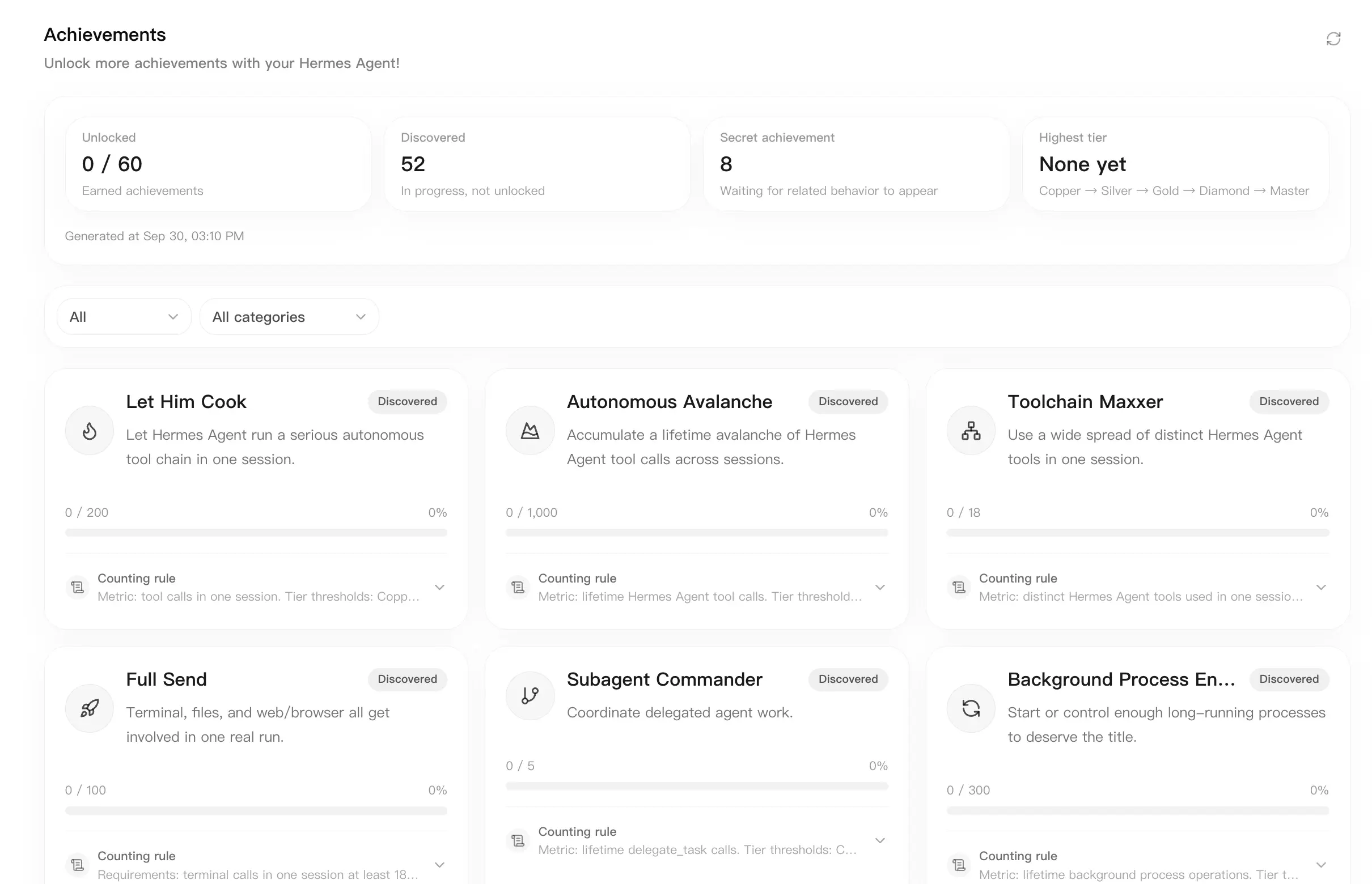
Achievements are not something you configure manually. LightVela generates them from the historical behavior of the current Bot's Hermes Agent. They help you understand which Agent capabilities you have already explored and whether the achievements module has read the latest history.
If you are new to LightVela, first try basic workflows such as Chat, Configure Skills, Memory Management, or Scheduled Tasks, then return to Achievements to review progress.
Before you start
- Sign in to LightVela and make sure at least one Hermes Agent is active.
- Open the console for the Bot you want to inspect.
- To see meaningful progress, the Bot should already have real conversations, tool calls, configuration changes, or scheduled-task activity.
Achievements are read per Bot. After switching to another Bot, the snapshot and progress may be different.
Open the Achievements page
- Sign in to LightVela.
- Open the My Hermes console.
- Select Achievements in the settings navigation.
- Wait for the page to read the current Bot's Hermes history.
After loading finishes, the page shows statistic cards, status and category filters, and the achievement card grid.
Read the statistic cards
The top of the page shows four statistics:
| Statistic | Meaning |
|---|---|
| Unlocked | Achievements whose requirements have been completed, compared with the current visible total. |
| Discovered | Achievements that already have progress but are not unlocked yet. |
| Secret achievements | Achievements whose exact requirements remain hidden until relevant behavior appears. |
| Highest tier | The highest tier reached by the current Bot. The tier order is Copper, Silver, Gold, Diamond, and Olympian. |
If the page says Hermes history is being read, the achievements module is still scanning sessions. Wait for scanning to finish before treating the statistics as final.
Filter achievements
Use the two filters below the statistics:
- Status filter: show all, unlocked, discovered, or secret achievements.
- Category filter: filter categories such as Agent Autonomy, Debugging Chaos, Vibe Coding, Hermes Native, Research/Web, Tool Mastery, Model Lore, and Lifestyle.
If the page shows no matching achievements, switch both filters back to all. If the list is still empty, rescan the current Bot's history.
Read an achievement card
Each achievement card can include these fields:
| Field | Meaning |
|---|---|
| Name and description | The Hermes Agent behavior represented by the achievement. Secret achievements are shown as secret until discovered. |
| Status | Unlocked, discovered, or secret. |
| Tier | Tiered unlocked achievements can show Copper, Silver, Gold, Diamond, or Olympian. |
| Progress | Current progress, the next threshold, or a percentage. Secret achievements show hidden requirements. |
| Counting rule | Expand the rule to see what is counted, such as tool calls, log inspections, model configuration, or documentation activity. |
| Source session | Some achievements show the session title that contributed evidence for the progress. |
Counting rules come from Hermes Agent history. If a card says no counting rule was returned, that only means the page has no rule text to display for that card; it does not necessarily mean the achievement cannot be unlocked.
Rescan history
When you recently completed conversations, tool calls, or configuration work but the page has not changed, rescan the history:
- Open Achievements.
- Click the rescan button in the upper-right corner.
- Wait until the button stops spinning or the history-reading message disappears.
- Check whether the statistic cards and related achievement cards changed.
The rescan reads the current Bot's Hermes history. Bots with longer histories may take more time to scan.
Verify that progress was recognized
After completing a real action, use this checklist:
- In the current Bot, perform an action that can be counted, such as inspecting logs, using tools, changing model configuration, running a scheduled task, or maintaining documentation.
- Return to Achievements and rescan.
- Select Discovered or Unlocked in the status filter.
- Open the relevant card's counting rule and check whether progress, percentage, or source-session information changed.
If nothing changed, first confirm that the action happened in the same Bot you are viewing.
FAQ
Why did my achievement not update immediately after using a feature?
The page reads a history snapshot for the current Bot. After recent activity, you may need to rescan. Large histories can also take longer to scan.
Why are some achievements secret?
Secret achievement requirements appear after Hermes Agent detects the relevant behavior. Keep using Hermes Agent across debugging, tools, memory, skills, plugins, model configuration, and automation workflows to reveal more of them.
Why does the page say achievements failed to load?
Common causes include Hermes Agent being temporarily unavailable, a parsing failure, or an achievement command failure. Refresh or retry first. If the problem continues, use Diagnostics to inspect service status and logs.
Why did achievements change after switching Bots?
Achievements are read from the current Bot's history. Different Bots have different conversations, tool calls, memory, skills, and model-configuration history, so their progress can differ.
Do achievements affect my plan, credits, or permissions?
No. Achievements show usage progress only. They do not change your plan, AI credits, Bot quota, or permissions. For billing details, use Plans and Credits.
Last updated 2026-09-30