
Connectors (Beta)
Summary
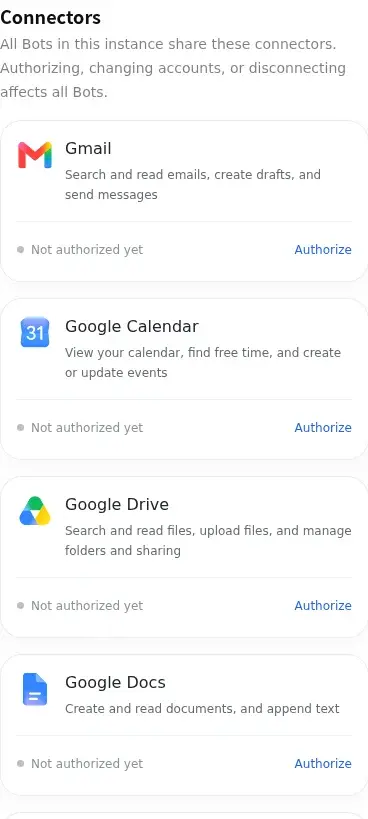
Connectors let a Bot use authorized external services. Open Daily → Connectors, marked Beta. Completing provider authorization is only one step: wait until the card also confirms that the instance configuration is ready before using the service.
Before you start
Select the intended, running Bot and prepare an account for the external service. Available services, sign-in requirements and permissions depend on the cards shown for your account. Connectors authorize app access; messaging channels are configured separately.
Authorize and connect
- Open Connectors and choose an available service card. Read the requested permissions and check which external account you are authorizing.
- Use the authorization or connection action offered by the card. Complete the provider’s steps; if a popup is blocked, follow the notice and return to this page afterward. Keep multi-step authorization open until it is complete.
- Return to the card and wait for authorization and configuration to finish. An authorized but still syncing or incomplete configuration is not ready. Follow any additional consent or enable action shown for the selected Bot.
Verify access
Check the connected account, Bot usage permissions and ready state. In an ordinary conversation with the same Bot, request a small read-only operation within the granted scope, then verify the result against the external app. A successful sign-in alone does not prove an operation succeeded.
Disconnect or change accounts
Read the confirmation before disconnecting or changing accounts. When the page says all Bots in this instance share the connector, authorization, account changes and disconnection affect all those Bots; other instances are unaffected. Where separate Bot usage controls are offered, disabling one Bot is different from revoking the shared account.
If something fails
For expired authorization, authorize again. For incomplete sign-in, continue the remaining steps. For configuration still syncing, wait for the status to settle; for a failed configuration, use the offered retry. If the result is uncertain, refresh the status before repeating a change. Check that the Bot is online and the requested operation is covered by its permissions.
For the other console settings, see Configuration overview.
Last updated 2026-11-17